
Download MDI2PDF – Convert MDI to PDF, Convert MDI to JPG, Batch MDI Conversion, Image Format Conversion Tool
Overview
MDI2PDF is a lightweight utility designed to address the limitations of the MDI (Multi-Document Interface) image format by converting it into more accessible and widely supported formats such as PDF and JPG. The primary purpose of this tool is to enhance file usability, enabling users to share, view, and edit images without the constraints imposed by the MDI format, which is known for its lack of compatibility across platforms and applications. This makes MDI2PDF particularly valuable for professionals and individuals working with legacy or specialized image data, especially in environments where file interchangeability is critical.
The target audience includes users who regularly encounter MDI files—such as those in technical documentation, medical imaging, or archival systems—who need a simple way to convert these files for broader use. While the app does not provide advanced editing capabilities, it focuses on streamlining the conversion process, thereby reducing workflow friction. Its straightforward functionality makes it suitable for both non-technical users and those with moderate experience in file management. The developer, MDI2PDF, has not provided additional background information beyond the app’s name, but the tool’s continued availability suggests a stable, niche-focused utility.
Within the broader productivity software ecosystem, MDI2PDF fills a specific gap by offering a no-frills conversion solution. It does not aim to replace full-featured image editors but serves as a reliable bridge between specialized file formats and standard digital workflows. Real-world use cases include preparing documents for sharing with colleagues, archiving images in a universally readable format, or integrating MDI-based content into reports and presentations.
Key Features & Functionality
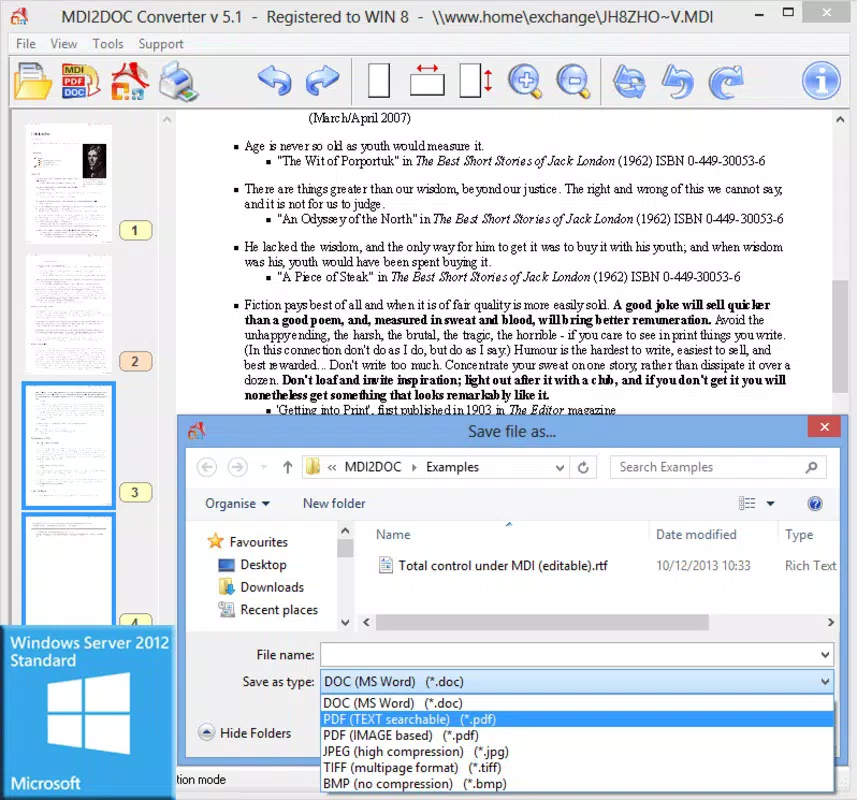
- Format Conversion: MDI2PDF enables users to convert MDI files into PDF and JPG formats. This functionality allows for seamless integration into common digital workflows, such as email sharing, document submission, and web publishing. Users can convert single files or entire folders, improving efficiency in content management.
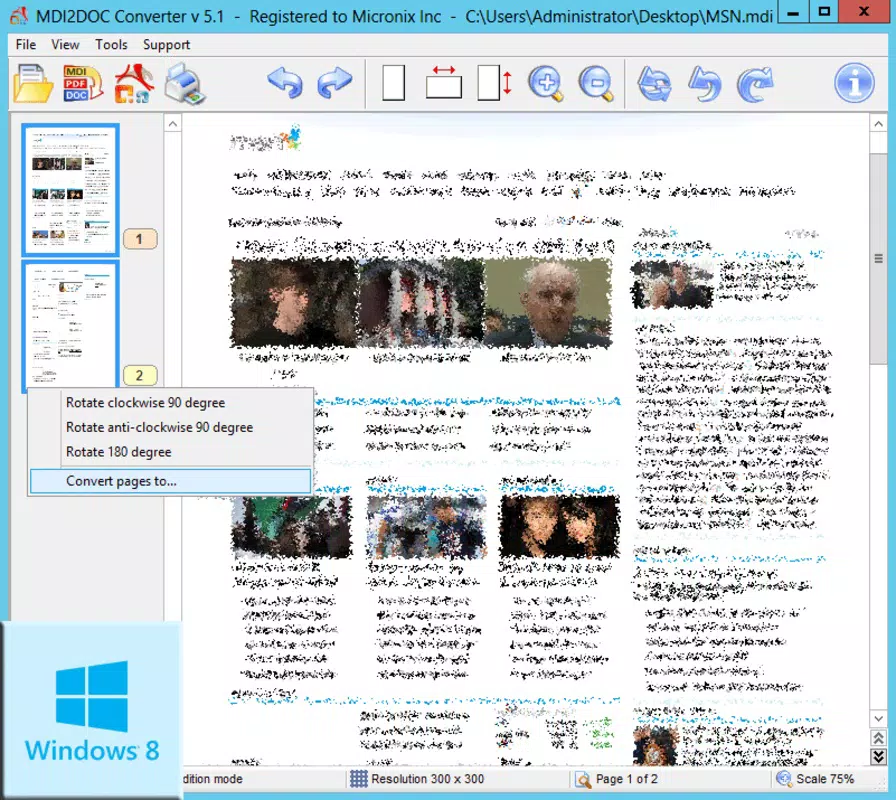
- Image Manipulation Options: The tool includes basic editing features such as rotating and mirroring images. These adjustments help users correct orientation or flip images before conversion, ensuring the output meets their intended visual standards. Additionally, screen settings can be adjusted for improved visibility during the conversion process.
- Batch Processing: One of the most practical features is the ability to process multiple MDI files within a specified folder simultaneously. This batch conversion capability significantly reduces manual effort, especially when handling large volumes of files, such as in data migration or archival projects.
- User-Friendly Interface: The interface is designed to be intuitive and accessible, minimizing the learning curve for new users. Navigation is straightforward, with clear options for selecting files, choosing output formats, and initiating conversion. This simplicity ensures that users of all skill levels can operate the tool effectively.
- Limitations for Advanced Editing: While MDI2PDF excels in conversion, it does not support advanced image editing tasks such as layer manipulation, color correction, or effects. Users requiring such capabilities are advised to use dedicated image editing software after conversion, which maintains the tool’s role as a specialized utility rather than a full-featured editor.
For example, a user managing a collection of scanned technical drawings saved in MDI format can use MDI2PDF to convert them into PDFs for inclusion in a project report. Similarly, a researcher compiling data from older systems can batch-convert MDI files into JPGs for use in presentations or digital archives.
Interface, UX & Performance
MDI2PDF features a clean and minimal interface that prioritizes functionality over visual complexity. The layout is organized around core tasks: file selection, format choice, and conversion initiation. Navigation is linear and predictable, allowing users to complete the conversion process in just a few clicks. The absence of cluttered menus or redundant options enhances usability, especially for users unfamiliar with technical tools.
Visual design is consistent with standard desktop utility applications—functional rather than aesthetic. Color schemes are neutral, and text labels are clear, reducing cognitive load during operation. The tool responds promptly to user inputs, with minimal lag during file processing, which contributes to a smooth user experience.
Although the developer did not list formal performance metrics, the application’s small file size of 2.5 MB suggests efficient resource usage. It is expected to run smoothly on most modern Windows systems without significant impact on system performance. Responsiveness is maintained across different screen resolutions, and the interface remains stable during batch operations. Stability during extended use has not been publicly documented, but the tool’s long-standing presence since 2016 indicates reliable operation under typical conditions.
Platform Compatibility & Technical Requirements
MDI2PDF is designed for the Windows platform and requires a compatible Windows operating system. The software version is 1.0, with a file size of 2.5 MB, indicating a lightweight footprint suitable for systems with limited storage. Specific minimum OS requirements were not listed by the developer, so users should ensure their system meets general Windows compatibility standards for running desktop utilities.
Given its release date of April 19, 2016, the application is likely optimized for Windows 7 and later versions. However, compatibility with newer Windows versions has not been confirmed. Users should test the software on their system to verify functionality. The absence of mobile or cross-platform availability means MDI2PDF is strictly a desktop utility, not available for Android, iOS, or other mobile environments.
Pros and Cons
Pros
- Free to download and use, making it accessible to all users.
- Supports conversion to widely used formats: PDF and JPG.
- Offers batch processing for efficient handling of multiple files.
- Simple, intuitive interface suitable for non-technical users.
- Lightweight application with minimal system resource usage.
Cons
- Lacks advanced image editing features beyond rotation and mirroring.
- No official support for mobile platforms or cloud integration.
- Specific OS compatibility details were not disclosed.
- Not updated since 2016, raising concerns about long-term maintenance.
- Does not support additional output formats beyond PDF and JPG.
FAQ
Is MDI2PDF safe to download and install?
Yes, MDI2PDF is available as a free tool with no reported malicious behavior. However, users should download it from trusted sources to ensure authenticity and avoid potential third-party modifications.
Can I use MDI2PDF on macOS or Linux?
No, the application is currently only available for Windows. There is no official version for macOS or Linux systems.
Does MDI2PDF support other file formats besides MDI?
No, the tool is specifically designed for MDI file conversion. It does not support input or output for formats other than MDI, PDF, and JPG.
Is MDI2PDF updated regularly?
The last known release was in 2016. The developer has not published updates since then, so the software may not support newer Windows features or security standards.
Can I convert MDI files to other formats like PNG or TIFF?
Currently, MDI2PDF only supports conversion to PDF and JPG. There is no built-in functionality for exporting to PNG, TIFF, or other image formats.
Final Thoughts
MDI2PDF remains a niche but functional tool for users dealing with MDI files. Its ability to convert these specialized files into universally accessible formats like PDF and JPG makes it a practical choice for those needing quick, reliable file transformation. While it lacks modern features such as cloud integration, mobile access, or advanced editing, its simplicity and free availability make it a valuable asset for specific workflows.
Users who frequently work with legacy MDI data—such as in technical documentation, archival projects, or data migration—will benefit most from this tool. Its batch processing and user-friendly design streamline repetitive tasks, saving time and effort. However, those seeking a comprehensive image editing suite should consider combining MDI2PDF with other software.
For its intended purpose, MDI2PDF delivers consistent performance and straightforward results. Despite its age, it continues to serve a clear need in the productivity space. Download MDI2PDF now.


